How Familiar Technology Can Support Rural Older Adults
Familiar technology can help rural older adults reach healthcare and support services when distance, transportation, and limited local provider availability make in-person access difficult. Familiarity should be treated as an accessibility requirement rather than a convenience.
Many digital health programs assume that the patient owns a smartphone, remembers credentials, installs applications, and navigates small touch controls. Some older adults do this easily. Others rely on family members, avoid unfamiliar devices, or stop using a service after a confusing setup experience.
Begin with the devices people already use
Ask patients which devices they use independently. Review telephone, television, tablet, computer, wearable devices, and caregiver-supported access. Do not substitute household device ownership for patient ability.
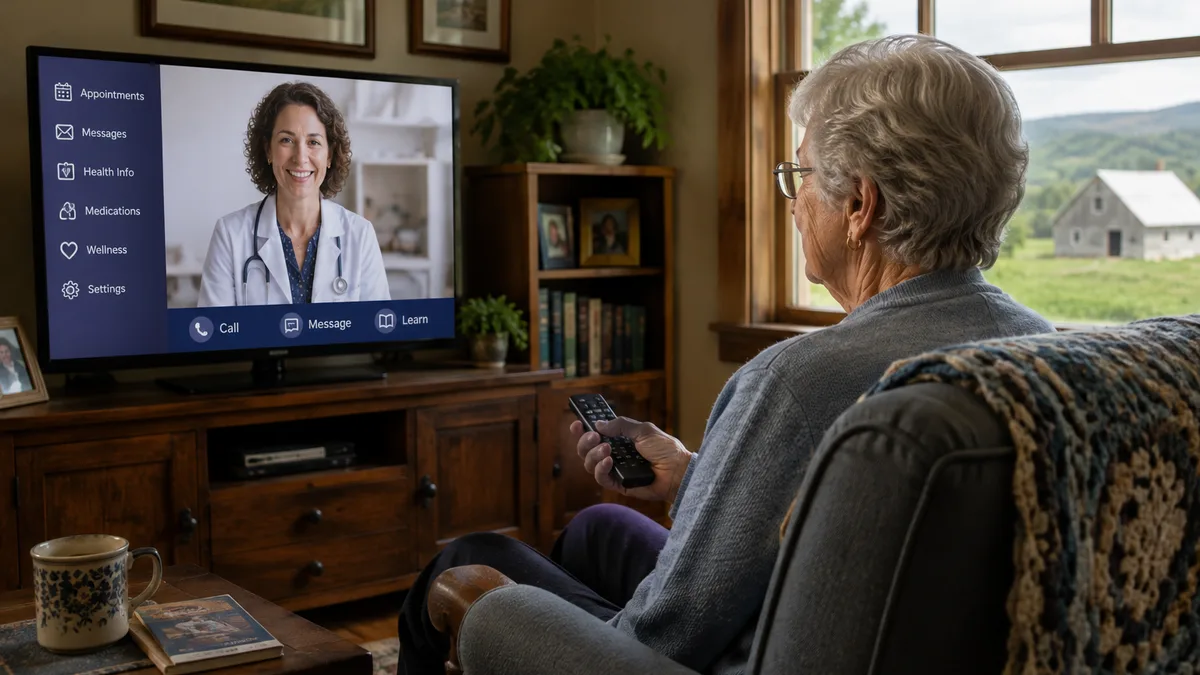
Television can be relevant because it offers a large display and a familiar remote-control interaction. Independa publicly describes access to video communication, health education, reminders, wellness services, and selected health functions through television, computer, or tablet.
A familiar screen still requires careful design. Operators should test font size, contrast, captions, audio, remote buttons, reading level, language, navigation depth, and recovery from mistakes.
Connect familiarity to a defined service
Technology should support a specific patient need. Examples include a follow-up visit that would otherwise require a long trip, a medication discussion, rehabilitation education, a wellness survey, a family check-in, or condition-specific content.
Avoid loading a device with services that lack a responsible owner. Every survey, alert, message, and measurement needs a response rule.
Plan for sensory and physical needs
Rural older adults may have hearing loss, reduced vision, limited dexterity, cognitive changes, fatigue, or mobility restrictions. The interface should accommodate these needs where possible.
Video visits need appropriate lighting, camera placement, volume, captions when available, and enough screen size for the patient to see the clinician. Remote controls should be simple. Written instructions should use clear language and readable type.
Include caregivers without removing patient control
Adult children and other caregivers may live far away. Digital communication can help them participate in visits, receive permitted updates, share messages, and support routine tasks.
Patient consent and privacy remain central. The system should distinguish patient, family, staff, and clinical roles. Access should end promptly when permission changes.
Support the complete experience
Installation, connectivity testing, training, replacement equipment, account recovery, and live assistance determine whether the service works. Rural programs should account for long distances when equipment requires physical service.
A remote support team may resolve software issues. Hardware or broadband problems may require a local partner. Procurement teams should identify that partner before launch.
Measure whether the endpoint expands access
Track independent use, caregiver-assisted use, training time, support calls, failed sessions, completed visits, survey completion, and trips avoided. Review results by age, location, language, disability, and connectivity level where appropriate.
The goal is not maximum screen use. The goal is reliable access to useful services.
Evaluate television-based platforms carefully
For a television-based approach, confirm compatible models, external equipment, camera and microphone requirements, remote-control design, broadband needs, software updates, privacy, support, and what happens during service interruptions.
Ask vendors to demonstrate the patient journey on the actual equipment. Include older adults in testing. Watch where they pause, misread a command, or need help.
Familiar technology can reduce one layer of rural healthcare friction. It works when the service, workflow, connectivity, and support are designed together.
Procurement questions for accessible endpoints
Ask whether the vendor supports multiple device types and whether features differ by device. Confirm camera, speaker, remote, set-top box, and network requirements. Review installation, replacement, software updates, and end-of-program equipment return.
Test privacy in the home. A large television may be visible or audible to other people. Patients need simple controls and clear information about when the camera and microphone are active.
Ask how the platform handles language, captions, volume, screen magnification, and caregiver assistance. Accessibility statements should be demonstrated on the configured product.
Avoid age-based assumptions
Older adults are not a single technology segment. Some use several digital services daily. Others prefer telephone or television. Physical ability, cognition, prior experience, trust, connectivity, and the value of the service influence use.
Segment by observed need and preference rather than age alone. Offer a choice where operationally possible. Reassess preferences after training and after major health or household changes.
A familiar endpoint earns its place when it helps the patient complete a useful action with less assistance and fewer failures.
Use familiar technology within a choice-based model
Familiarity differs by person. One patient may prefer television, another may prefer a telephone call, and another may use a tablet without assistance. A program should preserve choice when clinical and operational conditions allow it.
Choice also supports resilience. If a television service is unavailable, the patient may need a telephone or community access site. If a caregiver usually assists but is unavailable, the workflow needs another option.
Document the preferred and backup channel at enrollment. Review it after hospitalization, a move, a change in vision or hearing, or the loss of caregiver support.
Content and communication standards
Health content on a familiar screen should be concise, sourced, dated, and connected to an action. Long libraries can make useful information harder to find. Organize content around current care needs and common patient questions.
Messages should identify the sender and whether a response is expected. Clinical instructions should state whom to contact. Emergency language should be prominent and consistent.
Video and messaging features require privacy controls that patients understand. Show when a camera is active. Explain who can send content and who can see replies. Avoid placing sensitive information on a shared household screen without explicit design and consent.
Implementation across a rural service area
Conditions will vary by county, town, facility, and household. Pilot in several settings rather than one convenient site. Include patients with strong and weak connectivity, independent and caregiver-assisted users, and different sensory needs.
Document the setup that works in each environment. Standardize where possible, while retaining alternatives for locations that cannot meet the preferred technical design.
Record the final configuration, training method, and support history for each patient. This information helps teams diagnose repeat problems and select a better endpoint during future enrollment.
About Independa
Founded in 2009 and headquartered in San Diego, Independa, Inc. develops technology designed to help older adults stay connected, engaged, informed, and supported across senior living communities and at home. At the center of the company’s offering is the Independa Health Hub®, a health, wellness, engagement, and care platform that can be accessed through familiar screens, including televisions, tablets, computers, and phones.
Independa’s approach centers on making digital health and engagement services easier to access for older adults, including those who may be less comfortable using traditional computers or mobile applications. Through the Independa Health Hub®, users can access services such as video communication, social connection, family communication, wellness resources, telehealth, and other health-related tools. The platform is HIPAA-compliant and is available through supported LG and Sony smart TVs, DISH Network set-top boxes, computers, and tablets.
For senior living organizations, Independa extends beyond resident-facing communication. Its platform supports a range of community and enterprise functions, including resident and family engagement, digital signage, community calendars, dining menus, surveys, broadcast messages, work orders, and information delivered directly through resident televisions. This gives operators a way to bring communication, engagement, wellness, and selected care services into a coordinated technology environment while reaching residents through screens they already know how to use.
Independa also serves organizations across home care, home health, remote care, and other healthcare delivery models. Its technology can support virtual interaction between older adults, caregivers, family members, and healthcare professionals, including access to telehealth services and remote healthcare engagement.
The company describes its mission in practical terms: making health, wellness, communication, and care easier to access without requiring older adults to adapt to an entirely new technology environment. By bringing services to the television and other familiar devices, Independa is designed to support aging in place, resident engagement, family connection, remote care, and the broader goal of helping older adults remain more independent and connected.
Frequently Asked Questions
Why does familiar technology matter for older adults?
It can reduce the learning and setup burden associated with new devices, applications, passwords, and small touchscreen controls.
Can a television be used for health services?
A compatible television-based platform can support video, education, reminders, communication, and selected health services when connectivity, privacy, and clinical workflows are in place.
What accessibility features should be tested?
Test font size, contrast, captions, audio, remote controls, navigation depth, language, reading level, camera position, and recovery from mistakes.
How should caregivers be included?
Use patient-approved roles and permissions. Caregivers may help with setup, visits, reminders, and communication without replacing patient choice.
How should organizations measure success?
Measure independent and assisted use, completed services, training time, failed sessions, support calls, and travel avoided.